Building Illustra — AI Image Generation with A2A Protocol
Building a monorepo AI image generation app with LangChain, Gemini, and Stability AI — and the production bugs that taught me everything.
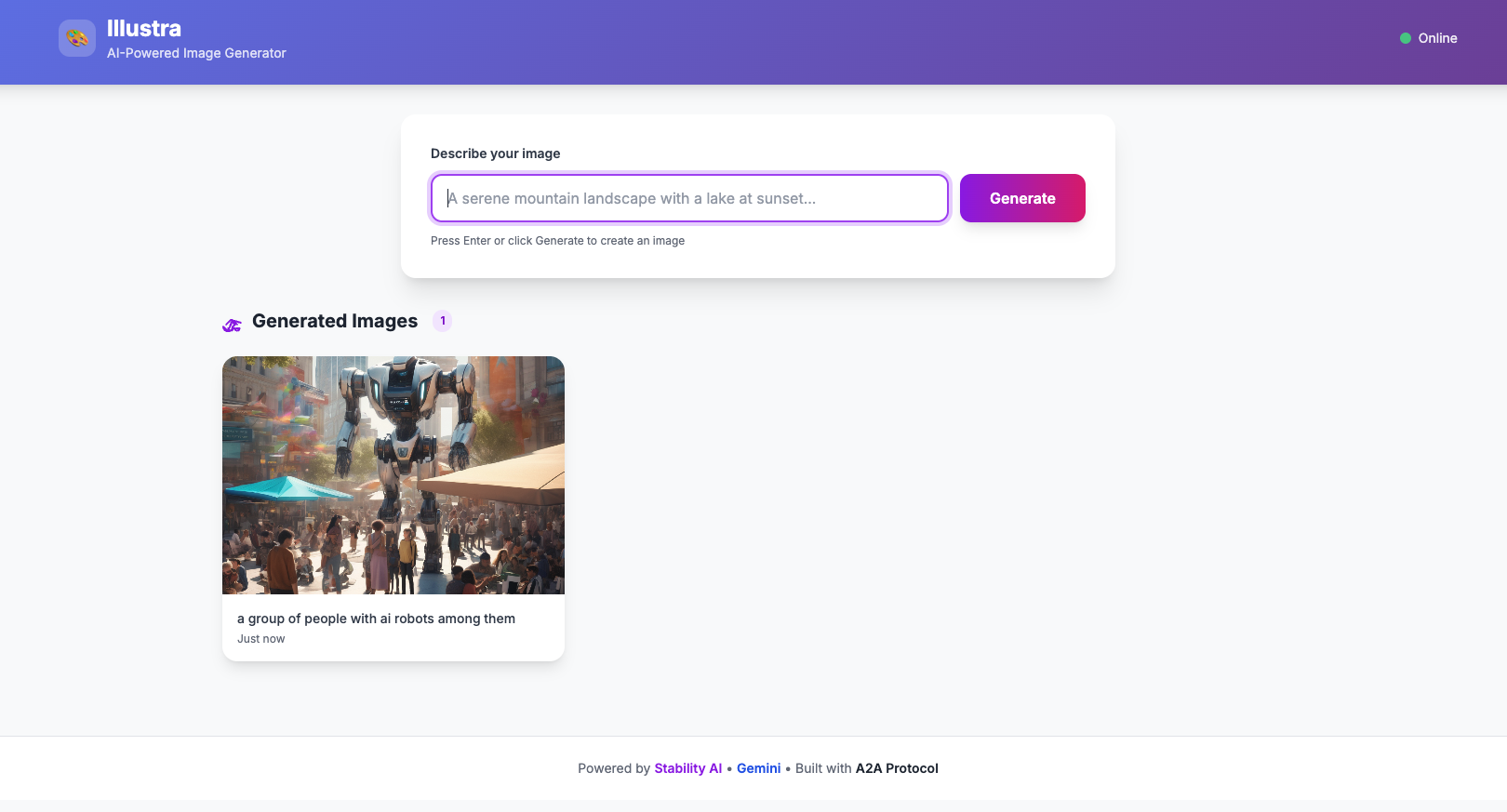
The Idea
What if you could generate images by just chatting with an agent? Not a complex UI with sliders and parameters — just type what you want, and get it back.
I built Illustra as a two-service monorepo to experiment with Google's A2A (Agent-to-Agent) protocol — a JSON-RPC based communication layer that lets AI agents talk to each other in a standardized way. The goal: combine LLM prompt enhancement with Stability AI image generation, all orchestrated through clean API boundaries.
User → Illustra UI (Express + Tailwind)
         ↓ /api/generate
       Illustra Agent (LangChain + Gemini)
         ↓ tool call
       Stability AI (image generation)
         ↓ upload
       GCS Bucket → Public URL
Architecture
The system has two services, each independently deployable on Google Cloud Run:
Agent Service (`@illustra/agent`)
The brain. It runs a LangChain agent powered by Google Gemini that:
1. Receives A2A JSON-RPC requests at /a2a/invoke
2. Enhances the user's prompt using Gemini (turns "a cat" into something Stability AI can work with)
3. Calls a custom tool that hits the Stability AI API for image generation
4. Uploads the result to Google Cloud Storage
5. Returns a structured A2UI response (not just text — typed UI components)
The agent exposes an Agent Card at /.well-known/agent-card.json for A2A discovery — any compliant client can find and invoke it.
UI Service (`@illustra/ui`)
The face. An Express server with a Tailwind CSS single-page app that:
1. Presents a clean text input to the user
2. Proxies requests to the agent via the A2A protocol
3. Parses A2UI responses and renders the image
The UI is completely stateless — it doesn't know anything about image generation. It just speaks A2A.
The Build
Monorepo with Bun
Both services live in a single repo with Bun workspaces. Shared Makefile for build and deploy targets. Biome for linting, commitlint for conventional commits.
A2A Protocol
The Agent-to-Agent protocol is essentially JSON-RPC 2.0 over HTTP:
{
  "jsonrpc": "2.0",
  "id": 1,
  "method": "message/send",
  "params": {
    "message": {
      "role": "user",
      "parts": [{"type": "text", "text": "a sunset over mountains"}]
    }
  }
}
The response comes back as A2UI — structured data that describes UI components:
{
  "result": {
    "role": "assistant",
    "parts": [{
      "kind": "data",
      "data": {
        "type": "Image",
        "props": {
          "url": "https://storage.googleapis.com/illustra/images/1234567890.png",
          "alt": "a sunset over mountains"
        }
      }
    }]
  }
}
Cloud Run Deployment
Both services deploy via gcloud run deploy --source . — Google Cloud Build builds the Dockerfile automatically. Environment variables are injected via env.yaml files.
The Difficulties
This is where things got interesting. Everything worked perfectly locally. Production told a different story.
The 500 Error Mystery
After deploying both services, the UI returned a cryptic error:
SyntaxError: Failed to parse JSON from responseThe agent worked fine when tested directly. The UI was sending the right request. But the response couldn't be parsed as JSON.
Root cause: Three problems layered on top of each other:
1. Missing env.yaml in Cloud Run builds — The .gcloudignore file was excluding env.yaml, so the agent deployed without API keys. It returned an HTML error page, not JSON.
2. Port mismatch — Cloud Run defaults to port 8080. The UI was configured to listen on 3000. The deployment flags didn't match the runtime configuration.
3. No response validation — The UI blindly called response.json() without checking if the response was actually JSON. When it got an HTML error page back, it crashed.
The Fix
// Before: blind JSON parse
const data = await response.json();

// After: check content-type first
const contentType = response.headers.get("content-type") || "";
if (!contentType.includes("application/json")) {
  const rawText = await response.text();
  console.error(`Non-JSON response (status ${response.status}):`, rawText);
  return res.status(response.status).json({
    error: `Agent returned non-JSON response`
  });
}
const data = await response.json();
Three changes total:
env.yaml from .gcloudignore so it gets included in Cloud Run builds8080 (Cloud Run standard)The Lesson
Always validate before parsing. Never assume a response is JSON just because you expect it to be. Log the raw response on failure — it's the difference between a 5-minute and a 5-hour debugging session.
Results
Here are some images generated by the live system:


The system handles prompt enhancement, image generation, storage, and structured response delivery — all through clean API boundaries.
What's Next
*Illustra is open source: github.com/mnkrana/illustra*