The Local LLM Download Odyssey — BitNet, Xet Pointers, and aria2c
Three hours, four failed download attempts, a 135-byte Xet pointer trap, a 16-connection aria2c rescue, and the final gut punch: Qwen3 doesn't support tools in Ollama. The story of how llama3.1:8b won by default.

The Goal
I wanted a local LLM for coding agents. The requirements were straightforward:
User → OpenCode CLI
         ↓
       Local LLM (Ollama)
         ↓  tool calls
       Shell, Filesystem, Editor
No cloud dependencies. No API costs. Just a local model that can hold a conversation and call tools.
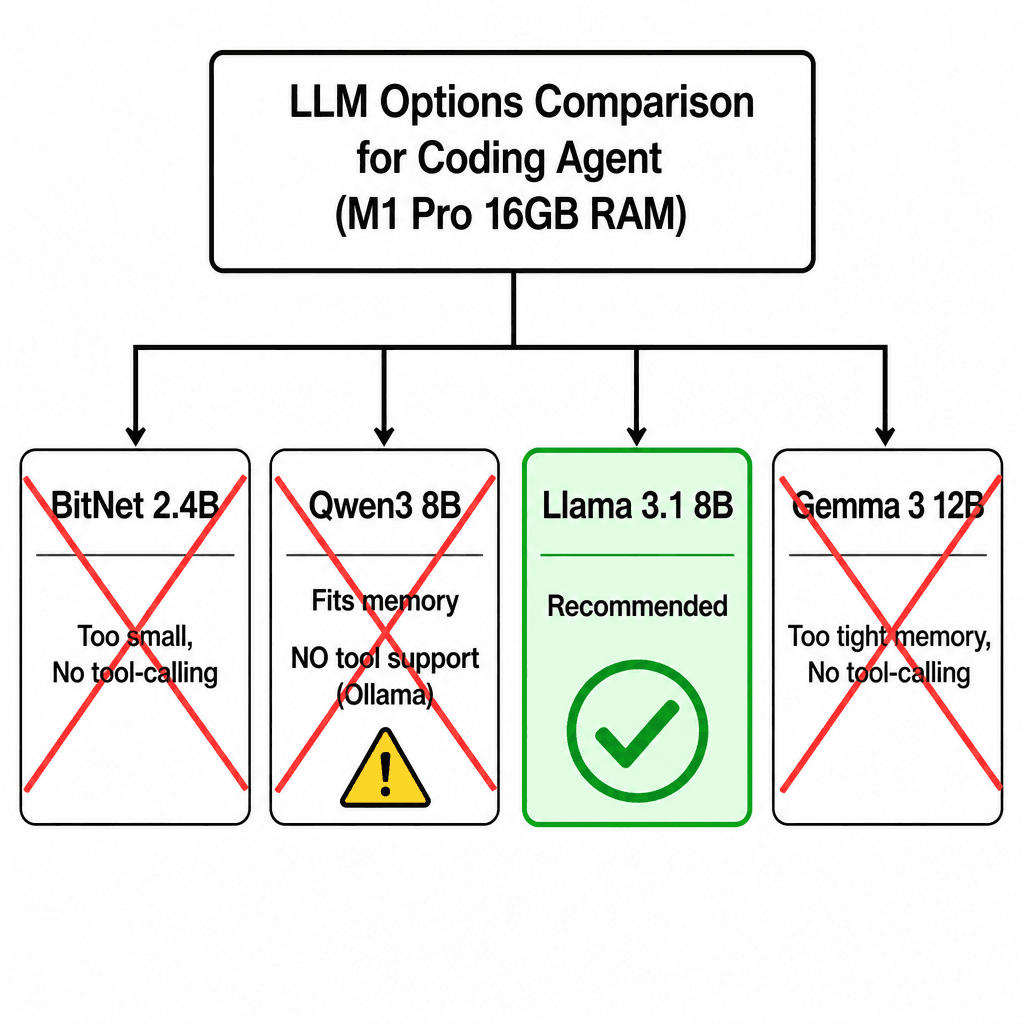
Why NOT BitNet
My first instinct was BitNet — Microsoft's 1-bit quantized transformer that promised extreme efficiency on consumer hardware. A 7B model at 1-bit precision should fit in ~1 GB of RAM, right?
I checked the repo. The largest available model is BitNet b1.58 2B4 — 2.4 billion parameters. That's tiny by modern standards. On the M1 Pro it runs at ~10 tokens/second, which is usable, but:
I confirmed BitNet wouldn't work for this use case and moved on.
Choosing the Right Model
With 16 GB of unified memory (shared between CPU and GPU on Apple Silicon), the constraints are tight. The model itself needs RAM, plus the KV cache during inference, plus the operating system and applications.
Qwen3 8B looked like the sweet spot. It's the latest generation from Alibaba, the GGUF includes tool-calling tokens (<tool_call>), and it fits in ~5 GB at Q4_K_M quantization.
What I didn't know yet: having tool tokens in the vocabulary is not the same as Ollama supporting them in its tool-calling protocol.
The Download Nightmare
I ran the simplest command possible:
ollama pull qwen3:8bAnd watched it fail. Over and over.
pulling manifest
pulling d3b30daebd3f...   0%   0 B/5.0 GB 4.1 MB/s 19m20s
error: connection error
The download would get anywhere from 2% to 60%, then stall and reset. I tried:
caffeinate ollama pull qwen3:8b — prevent sleepThe network connection just wasn't stable enough for a 5 GB download through Ollama's HTTP client, which doesn't support resumable downloads.
Xet Pointer Pitfall
Time for plan B: download the GGUF file directly from Hugging Face.
I found the Qwen3-8B Q4_K_M GGUF and hit download. The file finished in seconds. Suspiciously fast for 5 GB.
ls -la ~/Downloads/qwen3-8b-q4_k_m.gguf
# -rw-r--r--  1 mayank  staff  135 May 11 14:23 qwen3-8b-q4_k_m.gguf
135 bytes. That's not a GGUF file. That's a pointer.
Hugging Face uses Xet for large file storage — a content-addressed storage system. When you download via the browser, you sometimes get a tiny pointer file instead of the actual binary. The pointer contains a content hash that Xet uses to resolve the real file location.
cat qwen3-8b-q4_k_m.gguf
# xet pointer 0.1
# version: 0
# hash: sha256:a56061d03bd2055a8236c8a80ec2440a550a53eaecf935fb2ddf37c93995667c
# num_blocks: 200
# size: 5036387584
Lightning fast download! Too bad it's useless.
aria2c to the Rescue
I needed a download tool that could handle flaky connections. curl -C - sounded good in theory — auto-resume on failure — but it kept timing out on Hugging Face's CDN just like Ollama's built-in downloader. Single-threaded HTTP resume wasn't enough.
Time for the big guns: aria2c, the parallel download utility.
brew install aria2
aria2c -x 16 -s 16 -k 1M -c \
  "https://huggingface.co/Qwen/Qwen3-8B-GGUF/resolve/main/Qwen3-8B-Q4_K_M.gguf"
The flags:
-x 16 — open up to 16 connections to the same server-s 16 — split the file into 16 segments-k 1M — use 1 MB chunks-c — continue/resume if interruptedThis is the difference between a fragile single-threaded download and a swarm. When one connection drops, the other 15 keep pulling. When you resume, aria2c checks which chunks are done and only fetches the missing pieces.
The download ripped through at ~50 MB/s and completed in under 2 minutes. No resume needed — with 16 parallel connections, even if 14 died, the remaining 2 would finish the job.
ls -lah Qwen3-8B-Q4_K_M.gguf
# -rw-r--r--  1 mayank  staff  5.0G May 11 14:48 Qwen3-8B-Q4_K_M.gguf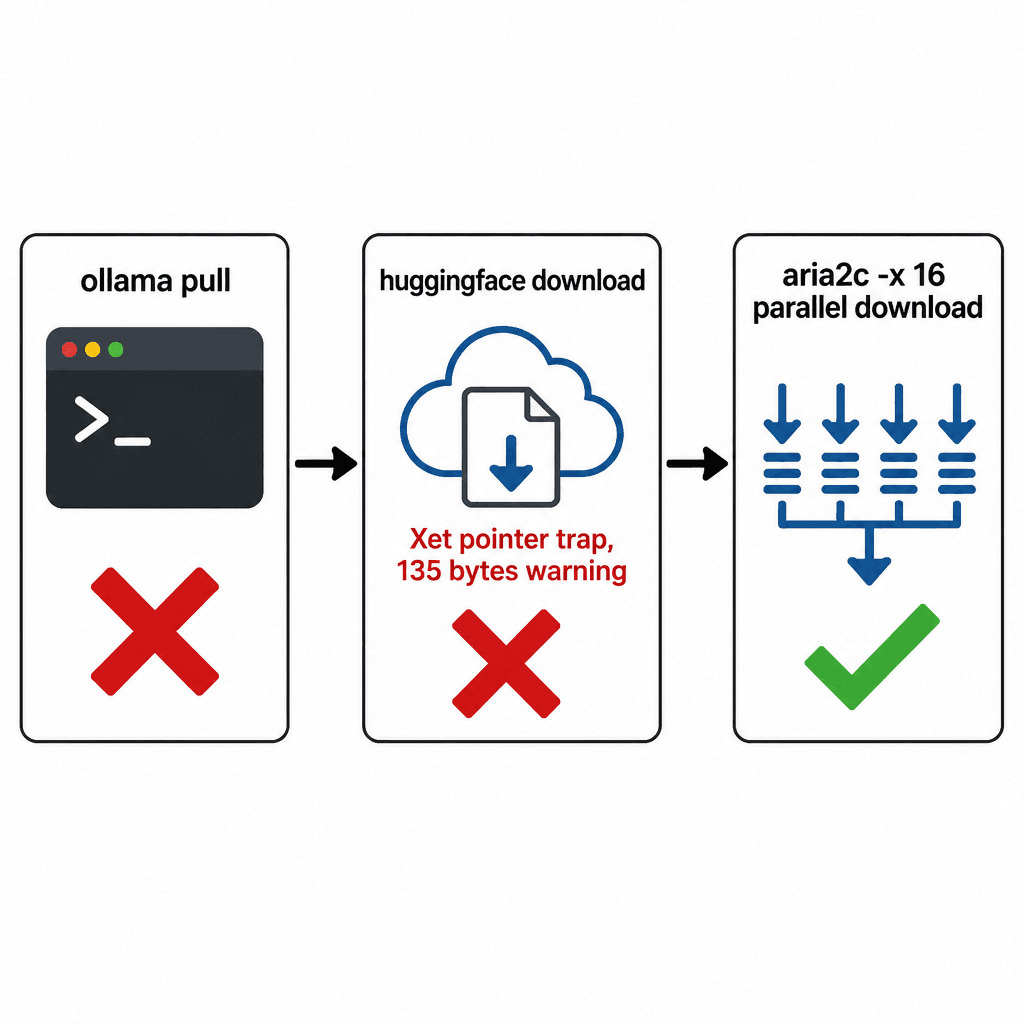
Verified the header too:
xxd Qwen3-8B-Q4_K_M.gguf | head -1
# 00000000: 4747 5546 07    GGUF.
The magic bytes confirm it's a valid GGUF version 7 file.
Ollama Import
With the GGUF on disk, I created an Ollama Modelfile and imported it:
FROM /Users/mayank/workspace/ai/research/test-langg/Qwen3-8B-Q4_K_M.gguf

TEMPLATE """{{- if .System }}
<|im_start|>system
{{ .System }}<|im_end|>
{{- end }}
<|im_start|>user
{{ .Prompt }}<|im_end|>
<|im_start|>assistant
"""

PARAMETER temperature 0.7
PARAMETER top_p 0.9
PARAMETER stop "<|im_start|>"
PARAMETER stop "<|im_end|>"
ollama create qwen3:8b -f ModelfileThe ollama create command reads the GGUF, computes a SHA256 digest, copies it into ~/.ollama/models/blobs/ as sha256-xxxxxxxx, and registers the model. It took about 30 seconds.
ollama list
# NAME              ID            SIZE    MODIFIED
# qwen3:8b          d3b30daebd3f  5.0 GB  2 minutes ago
Clean, fast, native. Just the way it should work.
The Twist — Qwen3 Doesn't Support Tools
I launched a coding agent pointing at the freshly-imported model:
ollama launch pi --model qwen3:8bAnd the agent fired back immediately:
Error: 400 registry.ollama.ai/library/qwen3:8b does not support toolsWait, what? I downloaded the GGUF directly — this isn't a registry model. But Ollama's tool-calling protocol checks a model metadata field that's embedded in the GGUF itself. When you ollama create from a GGUF, it preserves the original model's metadata from the registry.
The Qwen3 GGUF, as published on Hugging Face, was created from the Ollama registry model qwen3:8b — and that model is not flagged as supporting tools. The metadata survived the export and re-import.
So all that effort — the download nightmare, the Xet pointer trap, the aria2c parallel swarm, the Modelfile — and the model couldn't do the one thing I needed it to do.
The Real Solution — Llama 3.1
I switched to a model I knew would work:
ollama pull llama3.1:8bThis time, the download completed on the first try. No resume needed. About 8 minutes for 5.5 GB.
ollama launch pi --model llama3.1:8bIt worked immediately. Listed files, read directories, executed commands. Tool-calling worked out of the box.
 ls

 package-lock.json
 package.json
 Qwen3-8B-Q4_K_M.gguf
 src
 test-gemini.ts
The agent listed the directory contents — including the dusty Qwen3 GGUF file that started this whole journey, sitting there as a reminder of the detour.
Lessons Learned
1. BitNet is not ready for coding agents — The largest model (2.4B) is too small for multi-step reasoning, and there's no tool-calling support.
2. Tool support in Ollama is per-model metadata, not per-GGUF — A model can have <tool_call> in its vocabulary but still not work with Ollama's tool-calling protocol. Check before you download.
3. Always verify downloaded files — xxd | head -1 checks magic bytes. For GGUF, it's 47475546 (the ASCII for "GGUF"). A 135-byte file is never the real thing.
4. Use aria2c for large downloads over flaky connections — Ollama's built-in downloader and even curl -C - are single-threaded. aria2c splits the file into 16 parallel connections. When one drops, the other 15 keep pulling. It's the difference between a fragile straw and a steel cable.
5. Ollama import is straightforward — Download a GGUF, write a Modelfile, run ollama create. It worked perfectly. The problem wasn't the import — it was the model.
6. Trust what works — Llama 3.1 8B pulled and ran in 8 minutes. I spent 3 hours on Qwen3. Sometimes the simplest path is the right one.
The Qwen3-8B GGUF is still sitting in the test directory. Maybe I'll use it for something that doesn't need tool calls. But for coding agents, Llama 3.1 8B is the one that actually works.
Check more open source repos at: github.com/mnkrana/